
Overview
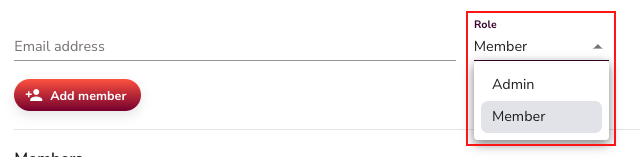
Every teammate in SalesMind AI is assigned a role when they join an agent. Roles control what each person can create, edit, or delete, keeping your team's data secure and your workflows clean.
Roles at a Glance
Member
- Create and manage campaigns, lists, and conversations
- View inbox activity and message threads
- Cannot delete campaigns, lists, or accounts
Admin
- Full access: create, read, and delete campaigns, lists, and accounts
- Manage team members and agent-level settings
- Responsible for high-stakes actions like removing data
⚠️ Warning: Admins can permanently delete campaigns and lists. Assign this role only to teammates who need that level of access.
Identifying Who Sent a Message
Each teammate has their own SalesMind AI environment, including separate campaigns and inbox activity. When reviewing the inbox, you'll see exactly who or what handled each message:
- Sender name shows which teammate validated or sent the message.
- Reply by Autopilot Nurturing tag means the AI handled the reply automatically.
- Human validation means a teammate reviewed and approved an AI draft before it was sent.
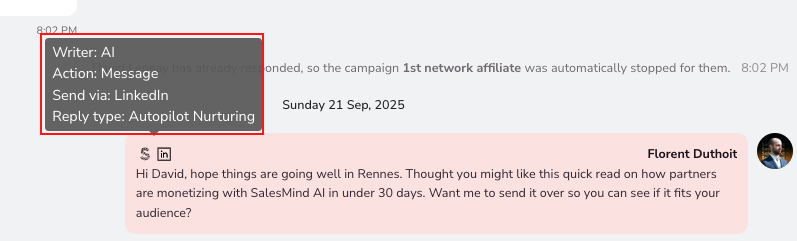
💡 Tip: This attribution makes it easy to audit outreach quality and coach teammates on their messaging.
Quick Reference
| Action | Member | Admin |
|---|---|---|
| Create campaigns | ✅ | ✅ |
| Manage lists | ✅ | ✅ |
| View inbox | ✅ | ✅ |
| Delete campaigns / lists / accounts | ❌ | ✅ |
| Manage team members | ❌ | ✅ |
What's Next
- To add a teammate to your agent, see the Inviting Teammates to Your Agent article.