
Prerequisites
- You have an active SalesMind AI account
- You have the URL of a LinkedIn post you want to target
- You're inside an agent and ready to add leads
What Is Import by Post Commenters?
This method imports everyone who commented on a specific LinkedIn post. Commenters go further than likers. They took the time to write something, which signals stronger interest and higher intent. These are some of the best cold leads you can find.
Step 1: Copy the Post URL
- Open LinkedIn and find the post you want to target
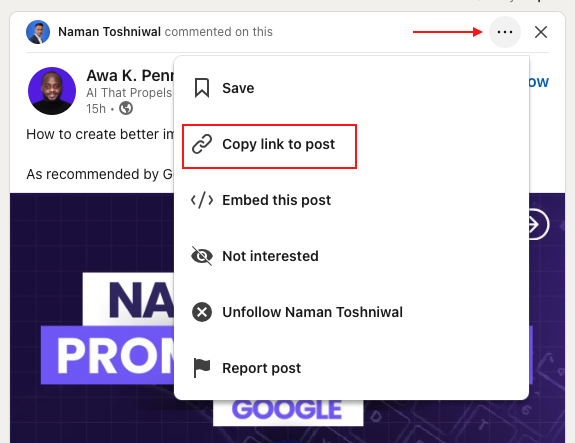
- Click the three-dot menu on the post and select Copy link, or copy the URL from your browser
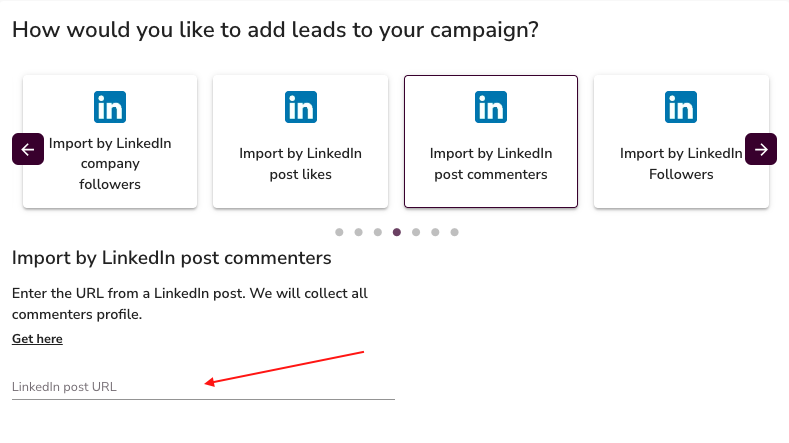
- In SalesMind AI, open the Post Commenters import option
- Paste the URL into the field
⚠️ Warning: The URL must point to a post, not a profile or company page. Post URLs typically contain
/posts/or/activity/in the path.
Step 2: How the Import Works
- SalesMind AI identifies everyone who commented on the post and adds them as leads
- Up to 1,500 commenters can be imported per post
👉 Note: Only public comments are captured. Private or deleted comments won't appear in the import.
Why This Method Works
A comment takes more effort than a like. People who comment are expressing opinions, asking questions, or sharing experiences related to the topic. That level of engagement usually means they care about the subject. If that subject is adjacent to your offer, you're starting the conversation with context already in place.
💡 Tip: Look for posts where your ideal customers are debating a problem you solve. The comment section is a ready-made prospect list.
What's Next
- Try Import by Post Likes for a broader pool from the same post
- Explore other import methods in the Import My Leads section
- Add your imported list to a campaign and configure your outreach sequence