
The Profile Followers method lets you import people who follow a specific LinkedIn profile. Followers of founders, influencers, or competitors are already engaged with your industry — making them strong outreach candidates.
Prerequisites
- An active SalesMind AI campaign in progress
- The LinkedIn profile URL you want to target (must be a personal profile, not a company page)
Steps
1. Find the LinkedIn profile
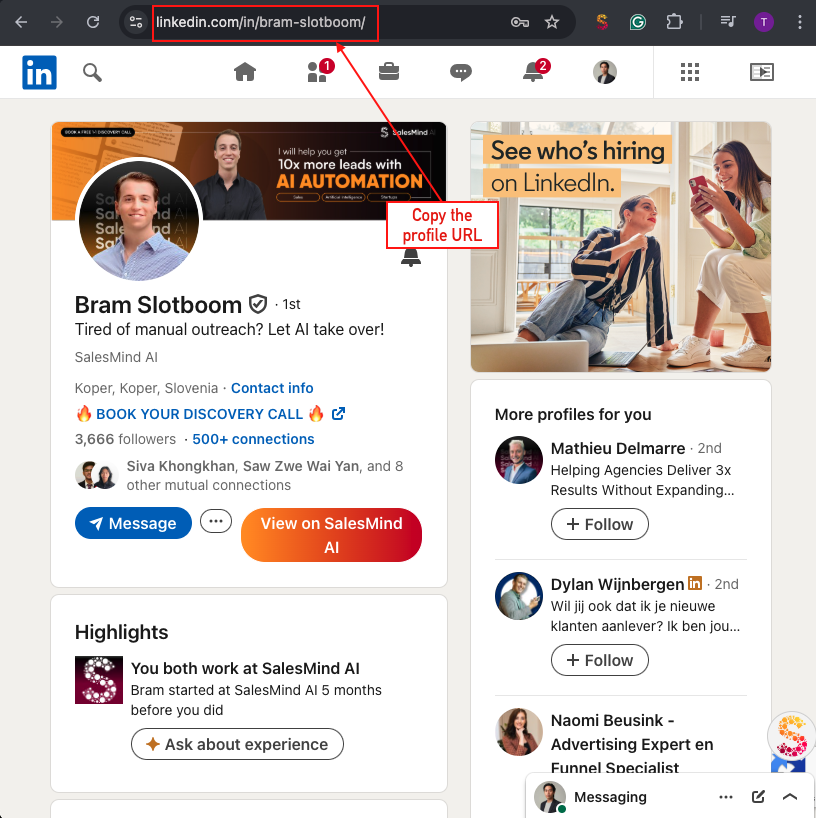
Go to LinkedIn and open the profile whose followers you want to import. Copy the full URL from your browser's address bar.
👉 Note: The URL must point to a personal LinkedIn profile (e.g.,
linkedin.com/in/username), not a company page.
2. Paste the URL into SalesMind AI
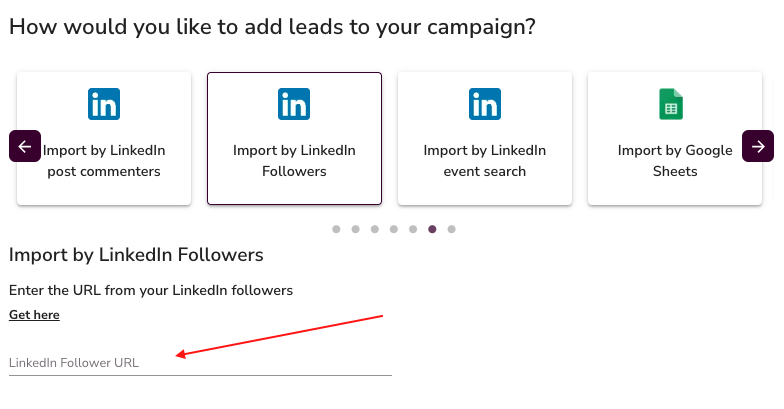
In your campaign's Import Leads step, select Profile Followers. Paste the profile URL into the input field.
3. Confirm the import
SalesMind AI retrieves the followers of that profile and adds them to your campaign as leads. Each import pulls up to 1,500 followers per profile.
💡 Tip: If the profile has more than 1,500 followers, consider targeting multiple related profiles to broaden your reach.
Why it works
Followers chose to follow that person — they're already interested in the topic, niche, or industry. Targeting followers of a competitor, thought leader, or industry influencer gives you a warm, pre-qualified audience rather than a cold list.
What's Next
- Add more leads using other import methods (LinkedIn Search, Google Sheets, Sales Navigator)
- Set up your message sequence to start reaching out to your imported leads
- Review your campaign settings before launching