
The Select from My List method lets you reuse lead lists you've already built inside SalesMind AI. Instead of running a new search, you pick a saved list and add it directly to your campaign.
This is ideal for retargeting, testing new messages on a known audience, or quickly launching campaigns without repeating the same import steps.
Prerequisites
- An active SalesMind AI campaign in progress
- At least one saved lead list in your account
Steps
1. Open the Import Leads step
During campaign creation, go to the Import Leads step and choose Select from My List.
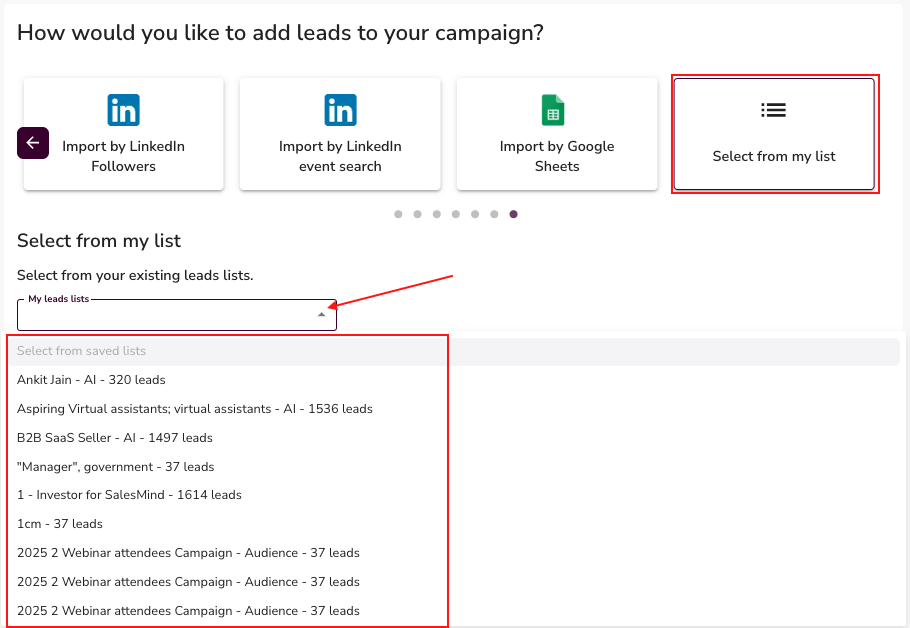
2. Choose a saved list
Your previously created lists will appear. These can include lists built from any import method:
- AI Lead Finder
- Sales Navigator
- LinkedIn People Search
- LinkedIn Company Followers
- LinkedIn Post Likes
- LinkedIn Post Commenters
- LinkedIn Profile Followers
- LinkedIn Event Search
- Google Sheets
Select the list you want to reuse.
3. Add to your campaign
Once selected, the leads from that list are imported into your new campaign. You can reuse the same list across multiple campaigns as many times as needed.
💡 Tip: Review the list before launching to make sure it still matches your targeting. Audiences can go stale if the list is old.
Why it works
Building a good lead list takes time. Once you've done it once, there's no reason to repeat the work. Reusing lists is especially useful when:
- You're testing a new message sequence on a proven audience
- You're running a follow-up campaign to a previous one
- You want to launch fast without waiting for a fresh import
What's Next
- Combine with other import methods to add fresh leads alongside your saved list
- Set up your message sequence and configure campaign settings
- Launch your campaign once the lead list looks right